Woman Modules
Overview
The Woman Modules in the Zindagi Mehfooz (ZM) App are designed to ensure comprehensive management of health data and activities related to women. These modules are a vital part of the app's functionality, aimed at improving healthcare access and tracking for women, especially in rural and underserved areas. The Woman Modules are divided into two core sub-modules: Woman Enrollment and Woman Follow-up. Together, these modules help ensure that women are properly registered, tracked, and provided with necessary health services.
The Woman Enrollment module captures the essential details of women who are enrolled in the healthcare system, making it easier for healthcare workers to provide timely services. Meanwhile, the Woman Follow-up module is designed to ensure that women receive regular check-ups, vaccinations, or health services based on their specific needs, thereby improving health outcomes.
Key Objectives
- Woman Enrollment ensures that personal details, health conditions, and vaccination status are accurately recorded at the start of the woman's healthcare journey.
- Woman Follow-up tracks and schedules ongoing health services, including vaccinations, check-ups, and other health-related activities, with reminders to ensure timely visits.
These modules are integrated into the Zindagi Mehfooz system to help with data accuracy, real-time tracking, and enhanced health monitoring, ultimately contributing to better healthcare delivery and outcomes for women.
1. Woman Enrollment
The Woman Enrollment module is used to capture and register information about women who need to be added to the system. This process ensures that essential data such as personal details, health information, and relevant medical history is collected and stored accurately. The enrolment process also lays the foundation for any subsequent follow-up activities, tracking, and health monitoring.
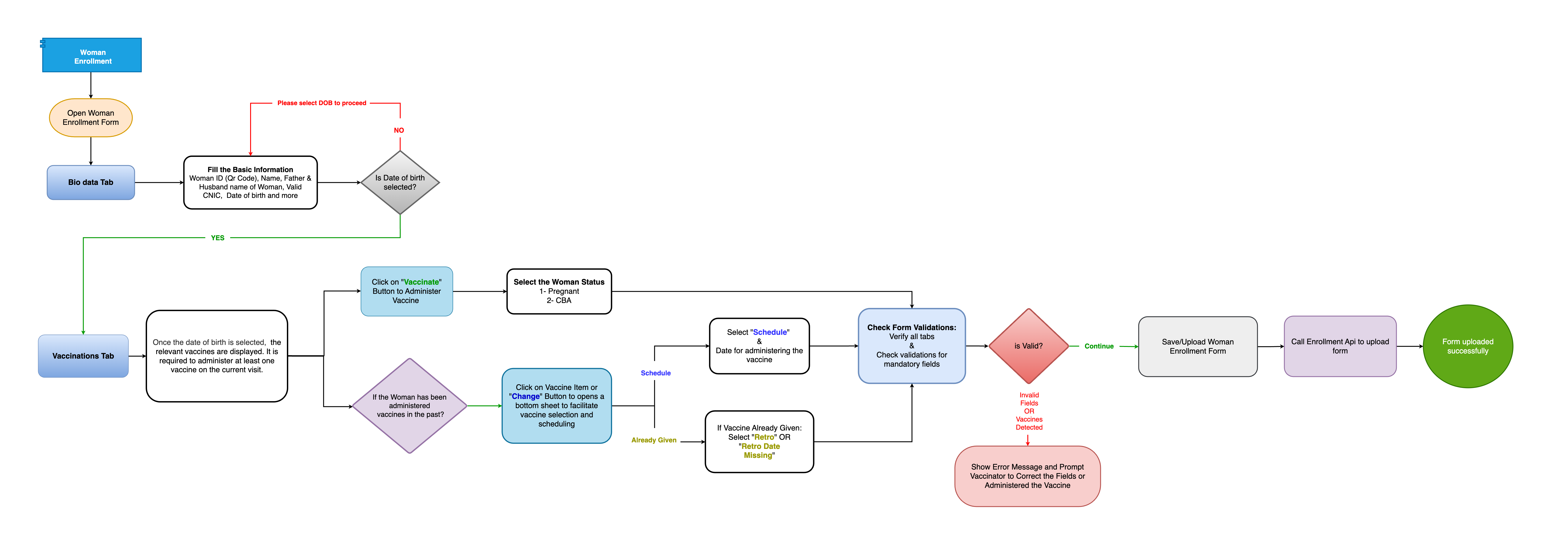
Process Flow of Woman Enrollment
The process flow for Woman Enrollment is as follows:
- Initiating Enrollment: The process starts when a new woman is identified for enrollment. The user (typically a health worker or vaccinator) initiates the enrollment process by accessing the Woman Enrollment form.
- Data Collection: The user fills in essential information such as:
- Personal information (Name, Age, Gender)
- Contact details (Phone number, Address)
- Health-related data (Pregnancy status, Health conditions)
- Vaccination history (if applicable)
- Verification: The system verifies the entered data to ensure completeness and accuracy. This can include cross-checking the woman’s ID, address, and other key details against existing records.
- Finalization: After verification, the data is saved to the database. A unique ID is generated for each enrolled woman, and she is officially added to the system.
Flowchart
2. Woman Follow-up
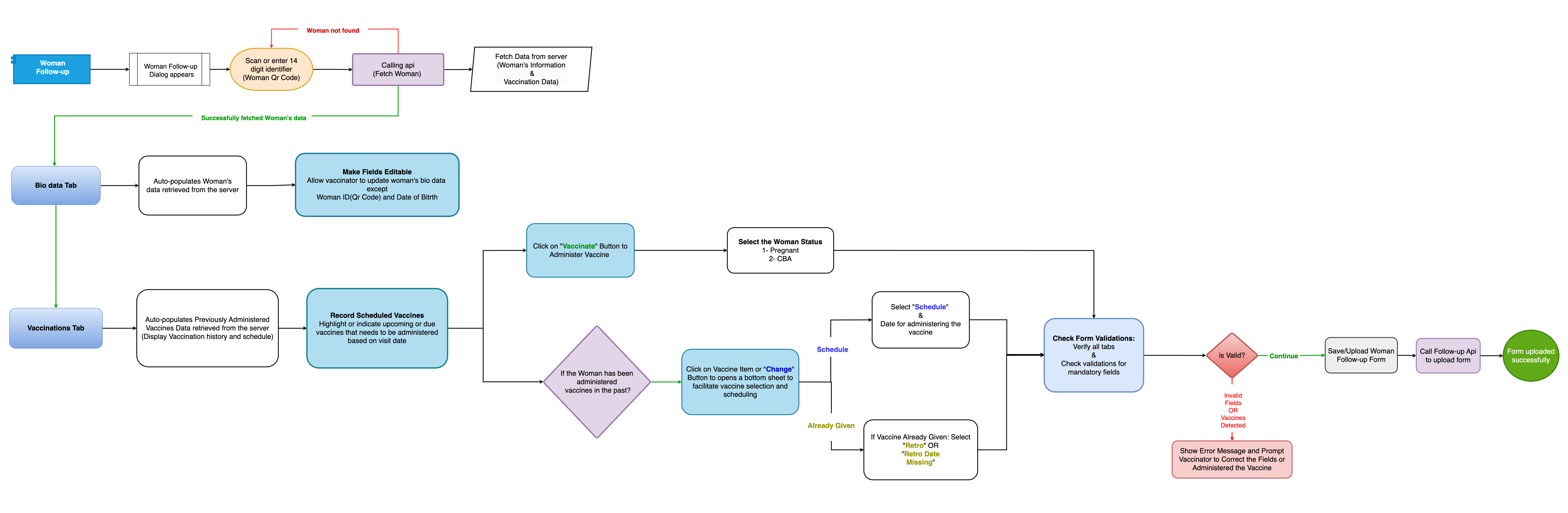
The Woman Follow-up module ensures that enrolled women receive timely follow-up services, especially for critical health checks, immunization, or other health-related services. The follow-up is vital to ensure that women stay on track with their health monitoring or vaccination schedules.
Process Flow of Woman Follow-up
- Initiating Follow-up: Once a woman is enrolled in the system, a follow-up schedule is created. This could be based on specific health needs (e.g., immunizations or check-ups) or pregnancy tracking.
- Reminder and Notification: The system automatically sends reminders or notifications to the health worker or the woman herself (if contact information is available) about upcoming visits or required actions.
- Follow-up Visit: On the scheduled date, the health worker performs the necessary follow-up actions, which may include:
- Health check-up
- Vaccination
- Medical counseling or support
- Recording Data: After the follow-up visit, relevant data (such as vaccination status, health condition changes, or other treatment updates) is recorded and updated in the system.
- Finalization: The follow-up process concludes when the required actions are completed, and the record is updated. If further follow-up is needed, the system schedules the next visit.
Flowchart